TreeMap Hierarchical Visualization
Overview
Displays hierarchical data as nested rectangles, where each rectangle's size represents a quantitative value. Perfect for showing survey response distribution across categories and subcategories.
Sample Preview
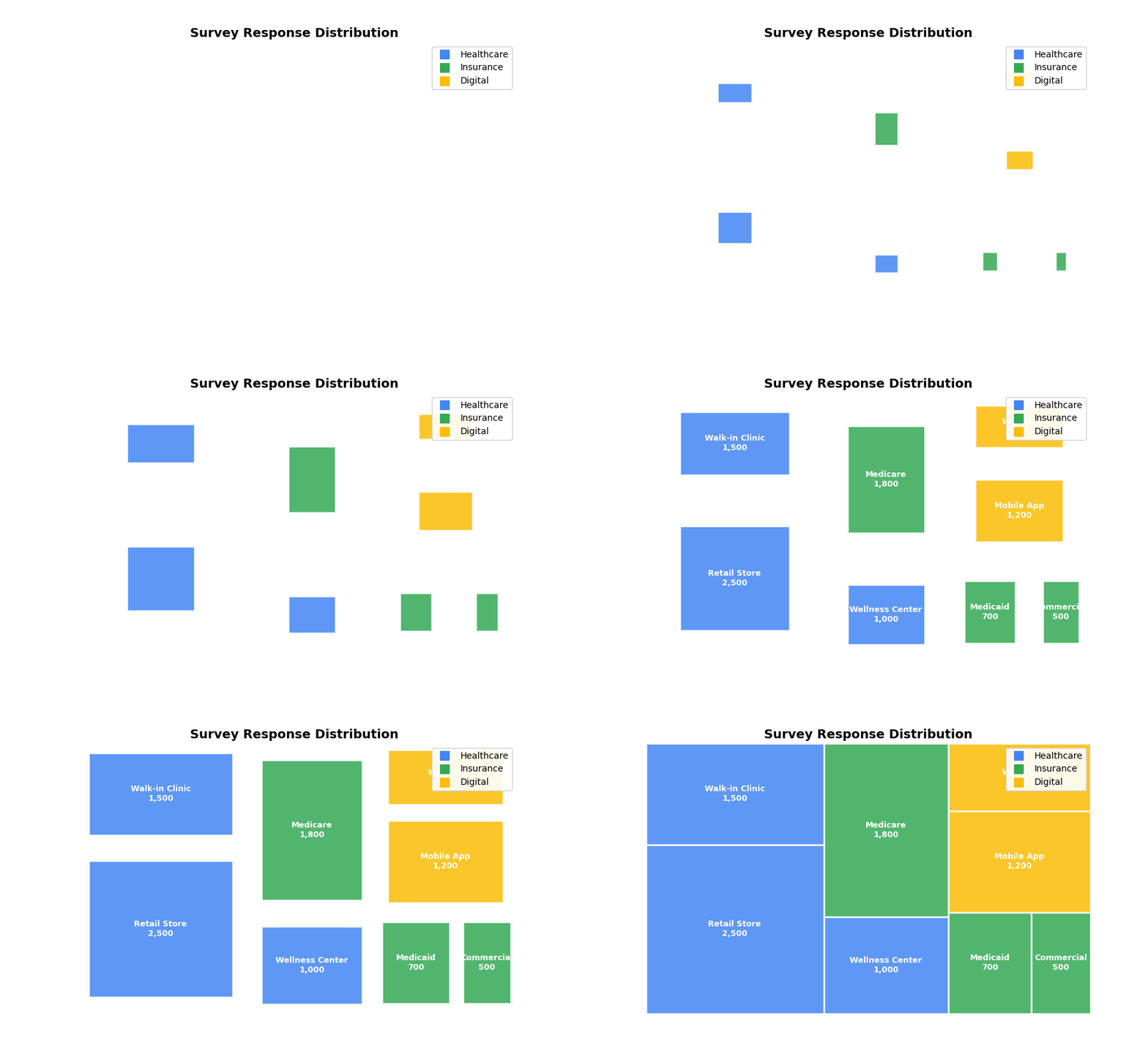
Best Use Cases
- Response Volume by Category - Show survey responses across business units and sub-departments
- Satisfaction Breakdown - Visualize satisfaction scores by service area and specific touchpoints
- Market Share Analysis - Display customer segments and their satisfaction levels
Sample Data Structure
AskRITA UniversalChartData
from askrita.sqlagent.formatters.DataFormatter import UniversalChartData

treemap_data = UniversalChartData(
    type="treemap",
    title="Survey Response Distribution",
    datasets=[],  # Empty for treemap charts
    hierarchical_data=[
        {"parent": "Root", "child": "Healthcare Services", "value": 5000},
        {"parent": "Healthcare Services", "child": "Retail Store", "value": 2500},
        {"parent": "Healthcare Services", "child": "Walk-in Clinic", "value": 1500},
        {"parent": "Healthcare Services", "child": "Wellness Center", "value": 1000},
        {"parent": "Root", "child": "Insurance Services", "value": 3000},
        {"parent": "Insurance Services", "child": "Medicare", "value": 1800},
        {"parent": "Insurance Services", "child": "Medicaid", "value": 700},
        {"parent": "Insurance Services", "child": "Commercial", "value": 500},
        {"parent": "Root", "child": "Digital Services", "value": 2000},
        {"parent": "Digital Services", "child": "Mobile App", "value": 1200},
        {"parent": "Digital Services", "child": "Website", "value": 800}
    ]
)
Google Charts Implementation
HTML Structure
<!DOCTYPE html>
<html>
<head>
    <script type="text/javascript" src="https://www.gstatic.com/charts/loader.js"></script>
</head>
<body>
    <div id="treemap_chart" style="width: 900px; height: 600px;"></div>
</body>
</html>
JavaScript Code
google.charts.load('current', {'packages':['treemap']});
google.charts.setOnLoadCallback(drawTreeMap);

function drawTreeMap() {
    var data = google.visualization.arrayToDataTable([
        ['ID', 'Parent', 'Response Count', 'Color Value'],
        ['Root', null, 0, 0],

        // Level 1 - Main Categories
        ['Healthcare Services', 'Root', 5000, 85],
        ['Insurance Services', 'Root', 3000, 75],
        ['Digital Services', 'Root', 2000, 65],

        // Level 2 - Healthcare Subcategories
        ['Retail Store', 'Healthcare Services', 2500, 88],
        ['Walk-in Clinic', 'Healthcare Services', 1500, 82],
        ['Wellness Center', 'Healthcare Services', 1000, 85],

        // Level 2 - Insurance Subcategories
        ['Medicare', 'Insurance Services', 1800, 78],
        ['Medicaid', 'Insurance Services', 700, 72],
        ['Commercial', 'Insurance Services', 500, 75],

        // Level 2 - Digital Subcategories
        ['Mobile App', 'Digital Services', 1200, 68],
        ['Website', 'Digital Services', 800, 62]
    ]);

    var options = {
        title: 'Survey Response Distribution by Service Area',
        titleTextStyle: {
            fontSize: 18,
            bold: true
        },
        minColor: '#e53e3e',
        midColor: '#fbb040',
        maxColor: '#38a169',
        headerHeight: 20,
        fontColor: 'white',
        fontFamily: 'Arial',
        fontSize: 12,
        showScale: true,
        generateTooltip: showTooltip
    };

    var tree = new google.visualization.TreeMap(document.getElementById('treemap_chart'));
    tree.draw(data, options);
}

function showTooltip(row, size, value) {
    const name = data.getValue(row, 0);
    const responses = data.getValue(row, 2);
    const satisfaction = data.getValue(row, 3);

    return `<div style="background:#fd9; padding:10px; border-style:solid">
        <span style="font-family:Courier">${name}<br/>
        Responses: ${responses.toLocaleString()}<br/>
        Satisfaction: ${satisfaction}%</span>
    </div>`;
}
React Implementation
import React, { useEffect, useRef } from 'react';

interface TreeMapData {
    id: string;
    parent: string | null;
    value: number;
    colorValue?: number;
}

interface TreeMapChartProps {
    data: TreeMapData[];
    title?: string;
    width?: number;
    height?: number;
    colorRange?: {
        min: string;
        mid: string;
        max: string;
    };
}

const TreeMapChart: React.FC<TreeMapChartProps> = ({
    data,
    title = "Hierarchical Data",
    width = 900,
    height = 600,
    colorRange = {
        min: '#e53e3e',
        mid: '#fbb040',
        max: '#38a169'
    }
}) => {
    const chartRef = useRef<HTMLDivElement>(null);

    useEffect(() => {
        if (!window.google || !chartRef.current) return;

        const chartData = new google.visualization.DataTable();
        chartData.addColumn('string', 'ID');
        chartData.addColumn('string', 'Parent');
        chartData.addColumn('number', 'Value');
        chartData.addColumn('number', 'Color Value');

        const rows = data.map(item => [
            item.id,
            item.parent,
            item.value,
            item.colorValue || item.value
        ]);
        chartData.addRows(rows);

        const options = {
            title: title,
            width: width,
            height: height,
            minColor: colorRange.min,
            midColor: colorRange.mid,
            maxColor: colorRange.max,
            headerHeight: 20,
            fontColor: 'white',
            showScale: true
        };

        const chart = new google.visualization.TreeMap(chartRef.current);
        chart.draw(chartData, options);
    }, [data, title, width, height, colorRange]);

    return <div ref={chartRef} style={{ width: `${width}px`, height: `${height}px` }} />;
};

export default TreeMapChart;
Survey Data Examples
Service Area Breakdown
// Survey responses by service area and department
var data = google.visualization.arrayToDataTable([
    ['ID', 'Parent', 'Response Count', 'Satisfaction Score'],
    ['Company', null, 0, 0],

    // Main service areas
    ['Product A', 'Company', 15000, 82],
    ['Product B', 'Company', 8000, 85],
    ['Product C', 'Company', 5000, 78],
    ['Digital', 'Company', 3000, 70],

    // Product A breakdown
    ['Retail', 'Product A', 12000, 83],
    ['Specialty', 'Product A', 2000, 79],
    ['Mail Order', 'Product A', 1000, 85],

    // Product B breakdown
    ['Walk-in Clinic', 'Product B', 5000, 87],
    ['Hub', 'Product B', 2000, 84],
    ['Telehealth', 'Product B', 1000, 82],

    // Product C breakdown
    ['Plan Medicare', 'Product C', 2500, 80],
    ['Plan Commercial', 'Product C', 1500, 76],
    ['Plan Medicaid', 'Product C', 1000, 75],

    // Digital breakdown
    ['Mobile App', 'Digital', 2000, 72],
    ['Website', 'Digital', 800, 68],
    ['Kiosk', 'Digital', 200, 65]
]);
Geographic Response Distribution
// Survey responses by region and state
var data = google.visualization.arrayToDataTable([
    ['Location', 'Parent', 'Responses', 'NPS Score'],
    ['United States', null, 0, 0],

    // Regions
    ['Northeast', 'United States', 8000, 74],
    ['Southeast', 'United States', 12000, 71],
    ['Midwest', 'United States', 6000, 73],
    ['West', 'United States', 10000, 76],

    // Northeast states
    ['New York', 'Northeast', 3000, 75],
    ['Massachusetts', 'Northeast', 2000, 78],
    ['Pennsylvania', 'Northeast', 1500, 72],
    ['Connecticut', 'Northeast', 1000, 74],
    ['Rhode Island', 'Northeast', 500, 76],

    // Southeast states
    ['Florida', 'Southeast', 4000, 73],
    ['Georgia', 'Southeast', 2500, 70],
    ['North Carolina', 'Southeast', 2000, 72],
    ['South Carolina', 'Southeast', 1500, 69],
    ['Virginia', 'Southeast', 2000, 71],

    // Top performing stores
    ['Store #1234 - Miami', 'Florida', 150, 85],
    ['Store #5678 - Orlando', 'Florida', 120, 82],
    ['Store #9012 - Tampa', 'Florida', 100, 80]
]);
Customer Segment Analysis
// Customer satisfaction by demographic segments
var data = google.visualization.arrayToDataTable([
    ['Segment', 'Parent', 'Customer Count', 'Satisfaction'],
    ['All Customers', null, 0, 0],

    // Age groups
    ['18-34 Years', 'All Customers', 5000, 68],
    ['35-54 Years', 'All Customers', 8000, 74],
    ['55+ Years', 'All Customers', 7000, 79],

    // Income brackets within age groups
    ['Low Income', '18-34 Years', 2000, 65],
    ['Middle Income', '18-34 Years', 2500, 70],
    ['High Income', '18-34 Years', 500, 72],

    ['Low Income', '35-54 Years', 2500, 71],
    ['Middle Income', '35-54 Years', 4000, 75],
    ['High Income', '35-54 Years', 1500, 78],

    ['Low Income', '55+ Years', 2000, 77],
    ['Middle Income', '55+ Years', 3500, 80],
    ['High Income', '55+ Years', 1500, 82],

    // Service usage patterns
    ['Frequent Users', 'High Income', 800, 85],
    ['Occasional Users', 'High Income', 1200, 75]
]);
Advanced Features
Custom Tooltips
function createCustomTooltip(row, size, value) {
    const id = data.getValue(row, 0);
    const parent = data.getValue(row, 1);
    const responses = data.getValue(row, 2);
    const satisfaction = data.getValue(row, 3);

    const percentage = ((size / getTotalSize()) * 100).toFixed(1);

    return `
        <div style="background: linear-gradient(135deg, #667eea 0%, #764ba2 100%);
                    color: white; padding: 12px; border-radius: 8px;
                    box-shadow: 0 4px 8px rgba(0,0,0,0.2); font-family: Arial;">
            <div style="font-size: 14px; font-weight: bold; margin-bottom: 8px;">
                ${id}
            </div>
            <div style="font-size: 12px; line-height: 1.4;">
                Responses: <strong>${responses.toLocaleString()}</strong> (${percentage}%)<br/>
                Satisfaction: <strong>${satisfaction}%</strong><br/>
                ${parent ? `Part of: ${parent}` : 'Top Level'}
            </div>
        </div>
    `;
}
Interactive Drill-Down
function createDrillDownTreeMap() {
    let currentData = topLevelData;
    let breadcrumb = ['All'];

    function drawTreeMap(data, title) {
        const chart = new google.visualization.TreeMap(document.getElementById('treemap_chart'));

        google.visualization.events.addListener(chart, 'select', function() {
            const selection = chart.getSelection();
            if (selection.length > 0) {
                const row = selection[0].row;
                const selectedId = data.getValue(row, 0);

                // Check if this item has children
                const childData = getChildData(selectedId);
                if (childData.length > 0) {
                    breadcrumb.push(selectedId);
                    drawTreeMap(childData, `${title} > ${selectedId}`);
                    updateBreadcrumb();
                }
            }
        });

        chart.draw(data, {
            title: title,
            generateTooltip: createCustomTooltip
        });
    }

    function updateBreadcrumb() {
        const breadcrumbElement = document.getElementById('breadcrumb');
        breadcrumbElement.innerHTML = breadcrumb.map((item, index) => {
            if (index === breadcrumb.length - 1) {
                return `<span class="current">${item}</span>`;
            } else {
                return `<a href="#" onclick="navigateTo(${index})">${item}</a>`;
            }
        }).join(' > ');
    }

    window.navigateTo = function(index) {
        breadcrumb = breadcrumb.slice(0, index + 1);
        const targetData = index === 0 ? topLevelData : getDataForLevel(breadcrumb[index]);
        drawTreeMap(targetData, breadcrumb.join(' > '));
        updateBreadcrumb();
    };

    // Initial draw
    drawTreeMap(currentData, 'Survey Response Distribution');
    updateBreadcrumb();
}
Color Coding by Performance
function getColorValueForSatisfaction(satisfaction) {
    // Convert satisfaction score to color value (0-100)
    if (satisfaction >= 80) return 90;      // Green
    else if (satisfaction >= 70) return 60; // Yellow
    else if (satisfaction >= 60) return 30; // Orange
    else return 10;                         // Red
}

// Apply color coding to data
var enhancedData = rawData.map(item => {
    const colorValue = getColorValueForSatisfaction(item.satisfaction);
    return [item.id, item.parent, item.responses, colorValue];
});
Responsive Design
function createResponsiveTreeMap() {
    function drawChart() {
        const container = document.getElementById('treemap_container');
        const width = container.offsetWidth;
        const height = Math.max(400, width * 0.6); // Maintain aspect ratio

        const options = {
            title: 'Survey Response Distribution',
            width: width,
            height: height,
            minColor: '#e53e3e',
            midColor: '#fbb040',
            maxColor: '#38a169',
            fontSize: Math.max(10, width / 80), // Scale font with size
            headerHeight: Math.max(15, width / 45)
        };

        const chart = new google.visualization.TreeMap(container);
        chart.draw(data, options);
    }

    // Initial draw
    drawChart();

    // Redraw on window resize
    window.addEventListener('resize', debounce(drawChart, 250));
}

function debounce(func, wait) {
    let timeout;
    return function executedFunction(...args) {
        const later = () => {
            clearTimeout(timeout);
            func(...args);
        };
        clearTimeout(timeout);
        timeout = setTimeout(later, wait);
    };
}
Key Features
- Hierarchical Visualization - Shows parent-child relationships clearly
- Size Proportional - Rectangle size represents quantitative values
- Color Coding - Additional dimension through color variation
- Interactive Selection - Click handling for drill-down functionality
- Custom Tooltips - Rich hover information display
When to Use
✅ Perfect for: - Hierarchical data with quantities - Part-to-whole relationships - Multi-level categorization - Space-efficient visualization - Portfolio or segment analysis
❌ Avoid when: - Flat data without hierarchy - Time-series analysis - Precise value comparison needed - Too many small categories (cluttered)
Performance Considerations
// For large datasets, consider data aggregation
function aggregateSmallCategories(data, threshold = 100) {
    const aggregated = [];
    const others = {};

    data.forEach(item => {
        if (item.value >= threshold) {
            aggregated.push(item);
        } else {
            const parent = item.parent || 'Root';
            if (!others[parent]) {
                others[parent] = { value: 0, count: 0 };
            }
            others[parent].value += item.value;
            others[parent].count += 1;
        }
    });

    // Add aggregated "Others" categories
    Object.keys(others).forEach(parent => {
        aggregated.push({
            id: `Others (${others[parent].count})`,
            parent: parent,
            value: others[parent].value,
            colorValue: 50 // Neutral color
        });
    });

    return aggregated;
}